
Android SDK
Accept cards, saved cards, and wallet payments in your native Android app
A native Kotlin SDK that drops a complete, Kashier-hosted payment experience into your Android app. Your app hands the SDK a session ID created by your backend; the SDK renders the payment sheet, collects card or wallet details, handles 3-D Secure, and returns a single typed outcome.
Your app never touches card numbers, CVVs, or Kashier API credentials.
| Field | Value |
|---|---|
| Artifact | io.kashier:kashier-android-sdk |
| Latest version | 1.0.0 |
| Distribution | Maven Central |
| Audience | Merchant developers integrating Kashier payments into native Android apps |
| Minimum Android API | 24 |
SDK overview
What it does
- Renders the Kashier payment sheet as a self-contained Activity inside your app.
- Supports card payments (new card and saved cards) and wallet payments.
- Handles 3-D Secure in an in-SDK WebView, including OTP challenges.
- Reconciles in-flight payments automatically, and reports a pending outcome rather than guessing when settlement is still running.
- Ships English and Arabic UI with full right-to-left layout for Arabic.
- Returns exactly one terminal outcome per launch, as a typed sealed result.
What it does not do
- No Apple Pay. Apple Pay is iOS-only and is not part of this SDK.
- No session creation. Sessions are created by your backend.
- No merchant credentials in the app. The SDK reads a server-provided hash from the session; it performs no client-side cryptography.
- No logging. The published AAR contains no logging interceptor and never writes request URLs, headers, bodies, hashes, card data, or customer data to logcat.
Payment method availability
The SDK renders card and wallet, filtered by the session's allowed-methods list. An empty allowed-methods list means all supported methods are shown. Your app cannot select the method — it is a server-side decision made when the session is created.
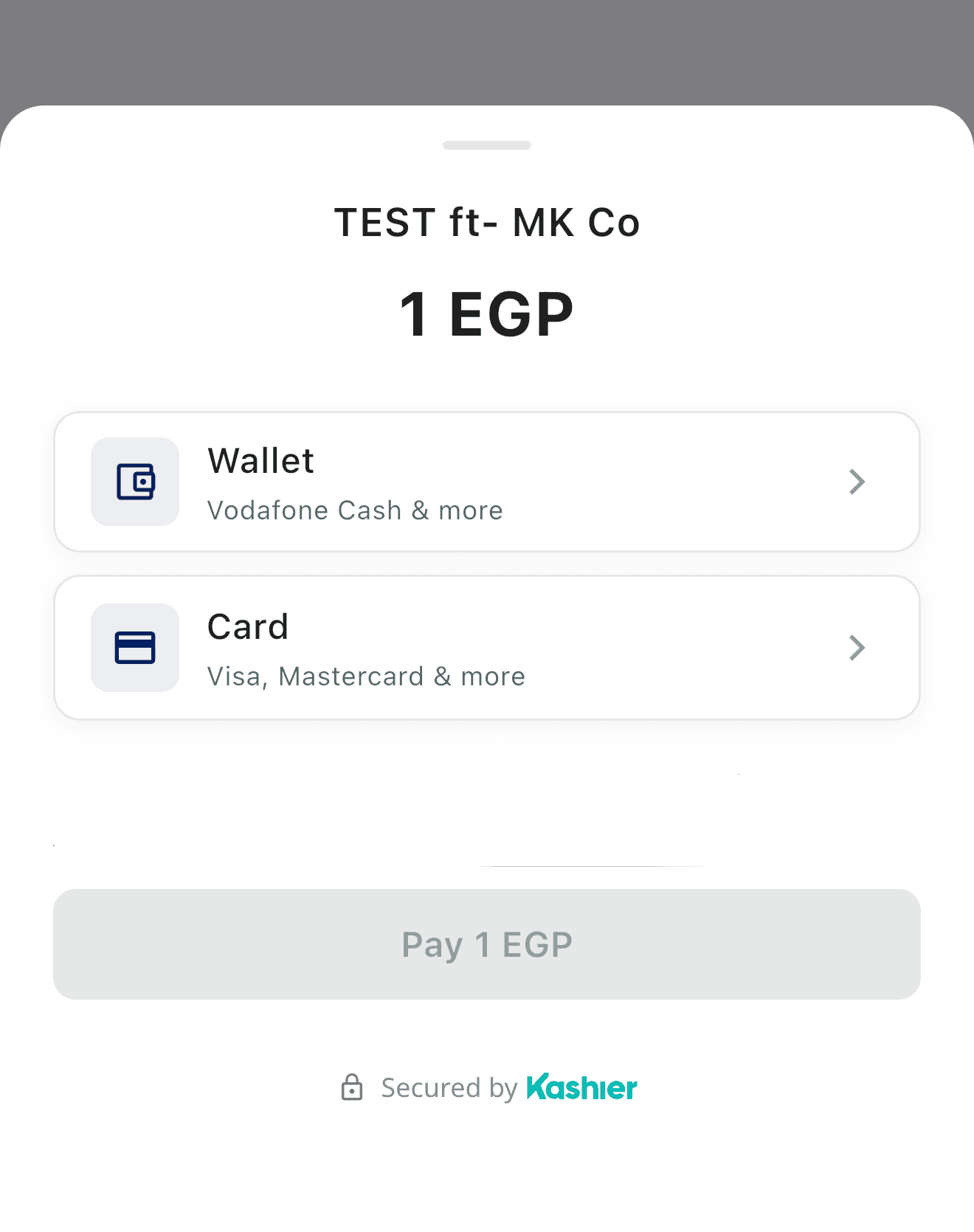
The payment sheet your users see. Method tiles are driven entirely by the session.
Architecture at a glance
Your Activity
  │  KashierSDK.initialize(KashierConfig(mode, language))      // once per process
  │  registerForActivityResult(KashierPaymentContract())       // in onCreate
  │  launcher.launch(KashierPaymentRequest(sessionId))
  ▼
Kashier payment Activity (internal, not exported)
  ├── GET session  →  payment sheet (card / wallet)
  ├── card    →  POST order  →  3-D Secure WebView  →  reconcile
  └── wallet  →  request-to-pay →  poll (max 5 min) →  reconcile
  ▼
KashierResult  →  Succeeded | Failed | Pending | Cancelled | Unavailable
Requirements
| Requirement | Value |
|---|---|
| Minimum Android API | 24 (Android 7.0) |
| Compiled against | Android API 36 |
| Java compatibility | 17 (source and target) |
| Kotlin (SDK build) | 2.1.20 |
| Android Gradle Plugin (SDK build) | 8.11.1 |
| Gradle (SDK build) | 8.14.3 |
| Host Activity type | androidx.activity.ComponentActivity or a subclass (e.g. AppCompatActivity) |
| Network | Internet access (permission is merged in automatically) |
| Backend | A server that creates Kashier payment sessions |
Your app module must compile with Java 17 compatibility:
android {
    compileOptions {
        sourceCompatibility = JavaVersion.VERSION_17
        targetCompatibility = JavaVersion.VERSION_17
    }
}

kotlin {
    compilerOptions {
        jvmTarget.set(org.jetbrains.kotlin.gradle.dsl.JvmTarget.JVM_17)
    }
}
The versions above are the toolchain the SDK itself is built with. Newer Android Gradle Plugin and Kotlin versions that still support Java 17 and compileSdk 36 are expected to work.
What is a session ID?
A session ID identifies a payment your backend created with Kashier before the user reaches checkout. It encodes the amount, currency, order reference, allowed payment methods, customer details, and the server-computed payment hash.
The SDK takes the session ID as its only input. It never creates sessions and never needs your Kashier API credentials. Create sessions server-to-server using the Kashier merchant API, then pass the returned session ID to your app over your own authenticated channel.
Note
Backend integration is out of scope for this guide. See the Payment Sessions API documentation for backend details.
Installation and setup
Add the dependency
The SDK is published on Maven Central as io.kashier:kashier-android-sdk. Integration is a single dependency — no extra repository, no manual AAR handling.
mavenCentral() is already present in default Android Studio templates. If your project pins its repositories, make sure it is declared:
// settings.gradle.kts
dependencyResolutionManagement {
    repositories {
        google()
        mavenCentral()
    }
}
Then add the dependency:
// app/build.gradle.kts
dependencies {
    implementation("io.kashier:kashier-android-sdk:1.0.0")

    // Required: the SDK's public API takes an androidx ComponentActivity, and the SDK
    // declares its androidx dependencies as `implementation` (they are not exported).
    implementation("androidx.activity:activity:1.9.3")
}
1.0.0 is the current public release. Pin an exact version — published versions are immutable.
Everything else the SDK needs at runtime — its Compose UI, networking, and coroutines dependencies — resolves transitively from Maven Central. The AAR also ships its own R8 / ProGuard rules, so there is nothing to add to your ProGuard configuration (see R8, ProGuard and security).
Android project setup
Permissions — nothing to declare
The SDK's manifest declares android.permission.INTERNET, which is merged into your app automatically. Nothing else is required.
The SDK deliberately does not request ACCESS_NETWORK_STATE. Its connectivity check is a DNS reachability probe, so your app is not forced to hold a network-state permission.
Activities — nothing to declare
The SDK's payment Activity is declared in the SDK manifest and merged in automatically. It is android:exported="false" with no intent filters — it can only be started through the SDK's own contract. Do not declare, reference, or attempt to start it yourself.
Compose is not required in your app
The SDK's UI is built with Jetpack Compose internally, but no Compose type appears on its public API. The Kashier demo app uses plain Android views. Your app can use views, Compose, or both.
Right-to-left
The SDK pins its own locale and layout direction from KashierConfig.language — Arabic renders full RTL regardless of the device locale, and English renders LTR regardless of an Arabic device. The SDK never mutates your app's configuration or windows.
You do not need android:supportsRtl="true" for the SDK's sheet to render correctly. Set it only if your own screens need RTL.
ProGuard / R8
Nothing to add. See R8, ProGuard and security.
Quick start
The smallest complete integration. It initializes the SDK, registers the result contract in onCreate, launches a payment, and handles every terminal outcome.
import android.os.Bundle
import androidx.activity.ComponentActivity
import androidx.activity.result.ActivityResultLauncher
import io.kashier.sdk.KashierConfig
import io.kashier.sdk.KashierLanguage
import io.kashier.sdk.KashierMode
import io.kashier.sdk.KashierPaymentContract
import io.kashier.sdk.KashierPaymentRequest
import io.kashier.sdk.KashierResult
import io.kashier.sdk.KashierSDK
import io.kashier.sdk.KashierUnavailableReason

class CheckoutActivity : ComponentActivity() {

    private lateinit var paymentLauncher: ActivityResultLauncher<KashierPaymentRequest>

    override fun onCreate(savedInstanceState: Bundle?) {
        super.onCreate(savedInstanceState)

        // 1. Initialize once per process, before any launch.
        if (!KashierSDK.isInitialized()) {
            KashierSDK.initialize(
                KashierConfig(
                    mode = KashierMode.TEST,
                    language = KashierLanguage.EN,
                )
            )
        }

        // 2. Register in onCreate — the Activity Result API forbids later registration.
        paymentLauncher = registerForActivityResult(KashierPaymentContract()) { result ->
            when (result) {
                is KashierResult.Succeeded -> {
                    // Display-safe. Confirm with your backend before fulfilling the order.
                    showReceipt(result.result.orderId, result.result.transactionId)
                }

                is KashierResult.Failed -> {
                    // result.error.message is English; result.error.messageAr is Arabic.
                    showError(result.error.message)
                }

                is KashierResult.Pending -> {
                    // Terminal: no success or failure will follow this launch.
                    // result.pending.orderId is the authoritative reference.
                    showPending(result.pending.orderId, result.pending.message)
                }

                is KashierResult.Cancelled -> {
                    returnToCheckout()
                }

                is KashierResult.Unavailable -> {
                    // The outcome could not be determined — do NOT assume failure.
                    when (result.reason) {
                        KashierUnavailableReason.processDeath,
                        KashierUnavailableReason.malformedResult,
                        KashierUnavailableReason.configMissing,
                        -> reconcileWithBackend(result.requestId)
                    }
                }
            }
        }
    }

    // 3. Launch with a session ID your backend created.
    private fun startPayment(sessionId: String) {
        paymentLauncher.launch(KashierPaymentRequest(sessionId))
    }
}
Blank session IDs throw
KashierPaymentRequest throws IllegalArgumentException if sessionId is blank. Validate the value you got from your backend before constructing it, or use the compatibility wrapper, which reports a blank session ID as a validationFailed callback instead of throwing.
SDK configuration
KashierSDK.initialize(
    KashierConfig(
        mode = KashierMode.LIVE,
        language = KashierLanguage.AR,
    )
)
KashierConfig
| Property | Type | Meaning |
|---|---|---|
mode | KashierMode | TEST or LIVE — selects the Kashier environment |
language | KashierLanguage | EN or AR — language and layout direction of the SDK payment UI |
KashierMode
| Value | API base URL | Payment-processing base URL |
|---|---|---|
KashierMode.TEST | https://test-api.kashier.io | https://test-fep.kashier.io |
KashierMode.LIVE | https://api.kashier.io | https://fep.kashier.io |
Both URLs are readable as mode.baseUrl and mode.fepBaseUrl.
Initialization contract
These rules are enforced by the SDK — read them carefully:
- Call
initializeonce, before any payment launch. - Calling
initializeagain with an equal config is a harmless no-op. - Calling
initializeagain with a different config throwsIllegalStateException. Dynamic reconfiguration — for example togglingTEST→LIVE, or switching language at runtime — is not supported. - Configuration is process-scoped and in-memory only. It does not survive process death.
KashierSDK.isInitialized()returnstrueonce initialization succeeded.
The safest place to initialize is Application.onCreate() or a guarded call in your checkout Activity, as shown in the quick start.
If you launch a payment before initializing, the compatibility wrapper reports unknownError with the message "KashierSDK.initialize() must be called before startPayment().".
Launching a payment
The SDK offers two launch surfaces. Both must be registered in onCreate, before the host Activity reaches STARTED — this is an Activity Result API rule, and AndroidX throws IllegalStateException on late registration.
Canonical Activity Result API (recommended)
Typed, exhaustive, and lifecycle-safe. Use this for new integrations.
private lateinit var launcher: ActivityResultLauncher<KashierPaymentRequest>

override fun onCreate(savedInstanceState: Bundle?) {
    super.onCreate(savedInstanceState)
    launcher = registerForActivityResult(KashierPaymentContract()) { result: KashierResult ->
        handle(result)
    }
}

fun pay(sessionId: String) = launcher.launch(KashierPaymentRequest(sessionId))
On this path the result is typed-only: KashierPaymentResult.transactionData and KashierPaymentError.details are always null. Raw backend response maps never cross the Activity-Result boundary.
Compatibility wrapper (callback style)
A listener-based surface with callback semantics matching Kashier's other SDKs. Useful if you are porting an existing integration or prefer callbacks to a sealed result.
private lateinit var launcher: KashierLauncher

override fun onCreate(savedInstanceState: Bundle?) {
    super.onCreate(savedInstanceState)
    launcher = KashierSDK.register(
        this,
        { result -> showReceipt(result) },              // onSuccess
        { error -> showError(error.message) },           // onFailure
        { pending -> showPending(pending.orderId) },     // onPending (nullable)
    )
}

fun pay(sessionId: String) = launcher.start(sessionId)
launcher.start(sessionId) never throws. Failures arrive on the failure listener:
| Situation | Callback |
|---|---|
| SDK not initialized | onFailure(unknownError) |
Blank sessionId | onFailure(validationFailed, "sessionId must not be blank") |
| Another payment already running | onFailure(validationFailed, "payment already in progress") |
Wrapper callback semantics
| Outcome | Wrapper behavior |
|---|---|
| Success | onSuccess fires after the user taps Done on the success sheet |
| Failure | onFailure fires after the failure sheet is dismissed |
| User cancellation | onFailure(KashierErrorCode.userCancelled) |
| Pending | onPending fires before the pending modal renders. The terminal result is not re-fired. If onPending is null, a pending payment produces zero callbacks |
| Undeterminable outcome | onFailure(unknownError, "Payment outcome unavailable (<reason>). Reconcile via your backend/webhook.") |
At most one merchant callback fires per payment.
Difference between the two surfaces
On the canonical Activity Result API, Pending is always delivered — after the pending modal's Done — even when no pending listener exists.
Wrapper registration rules
- A second
register(...)on the same Activity instance is idempotent: it returns the existing launcher with the originally supplied listeners. To change listeners, register on a fresh Activity instance. - Registration is cleaned up automatically at
ON_DESTROY. There is nounregister, and no callback fires after destruction. - A
KashierLaunchermust not be reused across Activity instances. Obtain a fresh one in each Activity'sonCreate. onPendingmay run while your Activity is STOPPED — it fires before the pending modal, while the SDK Activity is still in front. Treat it as a background callback and defer UI work behind your usual stopped-state guards.
Concurrency
The SDK holds a process-scoped single-payment lock. Launching a second payment while one is active is rejected with validationFailed and the message "payment already in progress" — it does not cancel or corrupt the running payment.
Handling payment results
KashierResult is a sealed interface with five variants. Every variant is terminal — a launch produces exactly one of them, and nothing follows.
Every variant carries a non-null requestId identifying the launch. Succeeded, Failed, and Pending always carry a real ID; Cancelled and Unavailable may carry KashierRequestId.UNKNOWN (the empty string) when identity could not be recovered.
| Variant | Payload | Meaning | Your action |
|---|---|---|---|
Succeeded | result: KashierPaymentResult | Payment completed successfully | Confirm server-side, then fulfil |
Failed | error: KashierPaymentError | Payment failed or was rejected | Show error.message; allow a retry with a new session |
Pending | pending: KashierPaymentPending | Settlement still running; no later success/failure for this launch | Show "processing"; reconcile via backend/webhook |
Cancelled | — | User dismissed the sheet or pressed back | Return to checkout |
Unavailable | reason: KashierUnavailableReason | Outcome could not be determined | Do not assume failure — reconcile via backend/webhook |
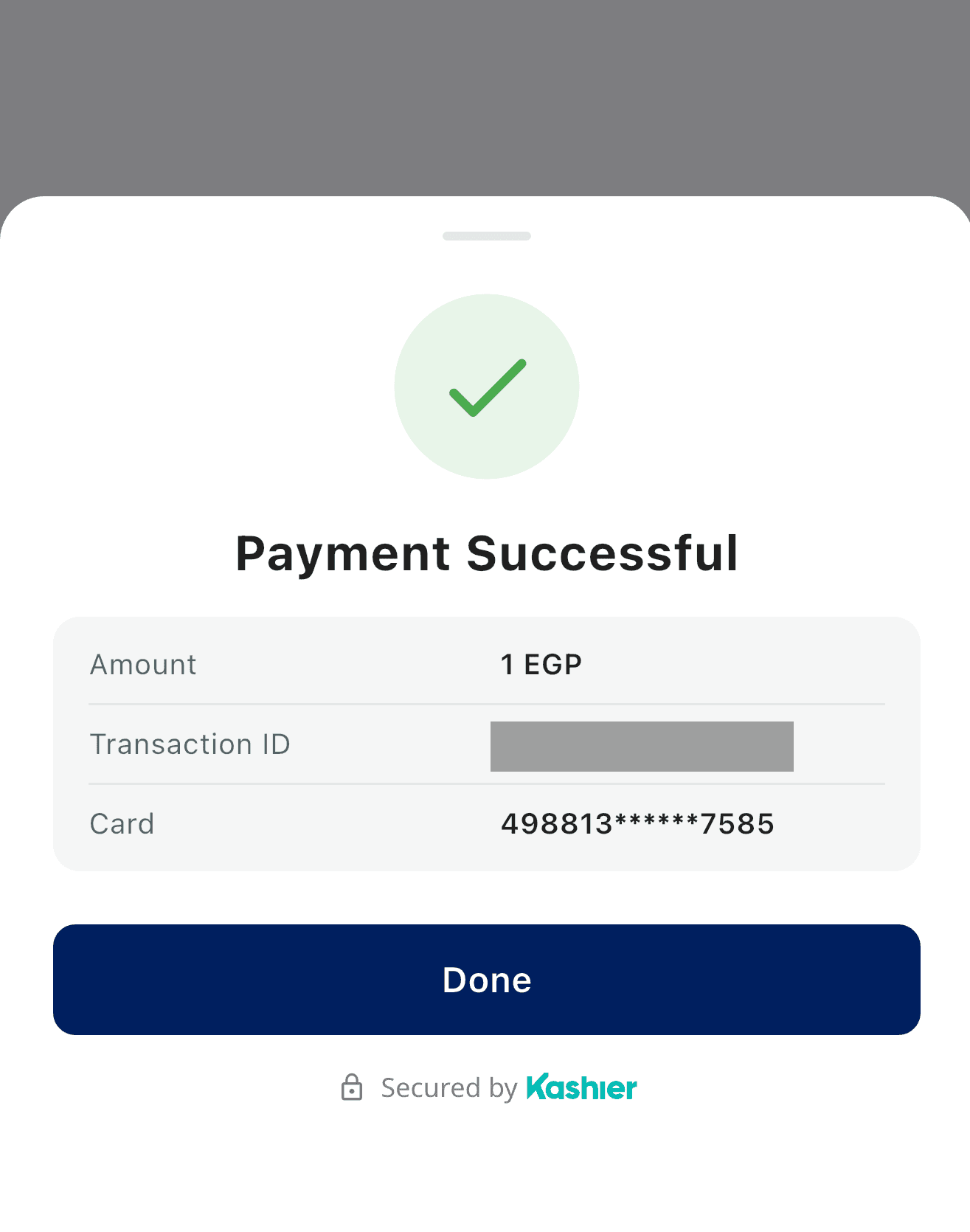
The success sheet. Succeeded reaches your app only after the user taps Done — the fields shown here map to KashierPaymentResult. The transaction ID is masked in this screenshot.
Which identifiers are authoritative
| Field | Use |
|---|---|
KashierPaymentResult.orderId | Kashier order ID (system order ID) — the reference to reconcile against |
KashierPaymentResult.orderReference | Your own merchant order reference |
KashierPaymentResult.transactionId | Transaction reference for support and receipts |
KashierPaymentPending.orderId | Authoritative for a pending payment |
KashierPaymentPending.transactionId | May be an empty string for a card pending — the reconcile response carries no transaction ID yet |
KashierResult.requestId | Correlates the outcome with the launch inside your app (SDK-local, not a Kashier identifier) |
When backend reconciliation is required
Always treat your backend and Kashier webhooks as the source of truth before releasing goods. Reconciliation is mandatory for:
Pending— the SDK explicitly stopped waiting.Unavailable— including after process death.- Any case where your app was killed before the result was delivered.
KashierPaymentResult fields
| Field | Type | Notes |
|---|---|---|
sessionId | String | The session this payment used |
status | String | Backend status string, e.g. "SUCCESS", "CAPTURED" |
orderId | String? | Kashier order ID |
orderReference | String? | Merchant order reference |
transactionId | String? | Transaction reference |
authorizationNumber | String? | Issuer authorization number |
amount | Double? | Approximate display value. Invalid or missing backend values map to null. Do not use for accounting — use your backend's amount |
currency | String? | Currency of the charge |
card | KashierCardInfo? | Display-safe card details |
message | String? | Localized message, English |
messageAr | String? | Localized message, Arabic |
transactionData | Map<String, Any?>? | Full raw backend response. Always null on the Activity Result API. Sensitive — see R8, ProGuard and security |
KashierCardInfo exposes brand, maskedNumber (e.g. 541674******7777), and wallet. It never carries a full PAN, CVV, or card token, so it is safe to show on receipts.
KashierPaymentPending fields
| Field | Type | Notes |
|---|---|---|
orderId | String | Authoritative reference |
transactionId | String | May be empty |
message | String | Localized to the configured language |
messageEn | String? | English message |
messageAr | String? | Arabic message |
Card and saved cards
Shown when the session allows card.
New-card flow
- The user opens the card form and enters number, expiry, CVV, and cardholder name.
- The SDK validates locally before any network call: Number — exactly 16 digits and a valid Luhn checksum. Expiry — month
1–12, not in the past. CVV and cardholder name — required. - Brand is detected from the number prefix and shown inline: Visa
4…; Mastercard51–55or2221–2720; Meeza BIN range507803–507960. - The SDK posts the order. If the gateway requires 3-D Secure, the SDK opens its own WebView (see 3-D Secure); otherwise it goes straight to the result sheet.
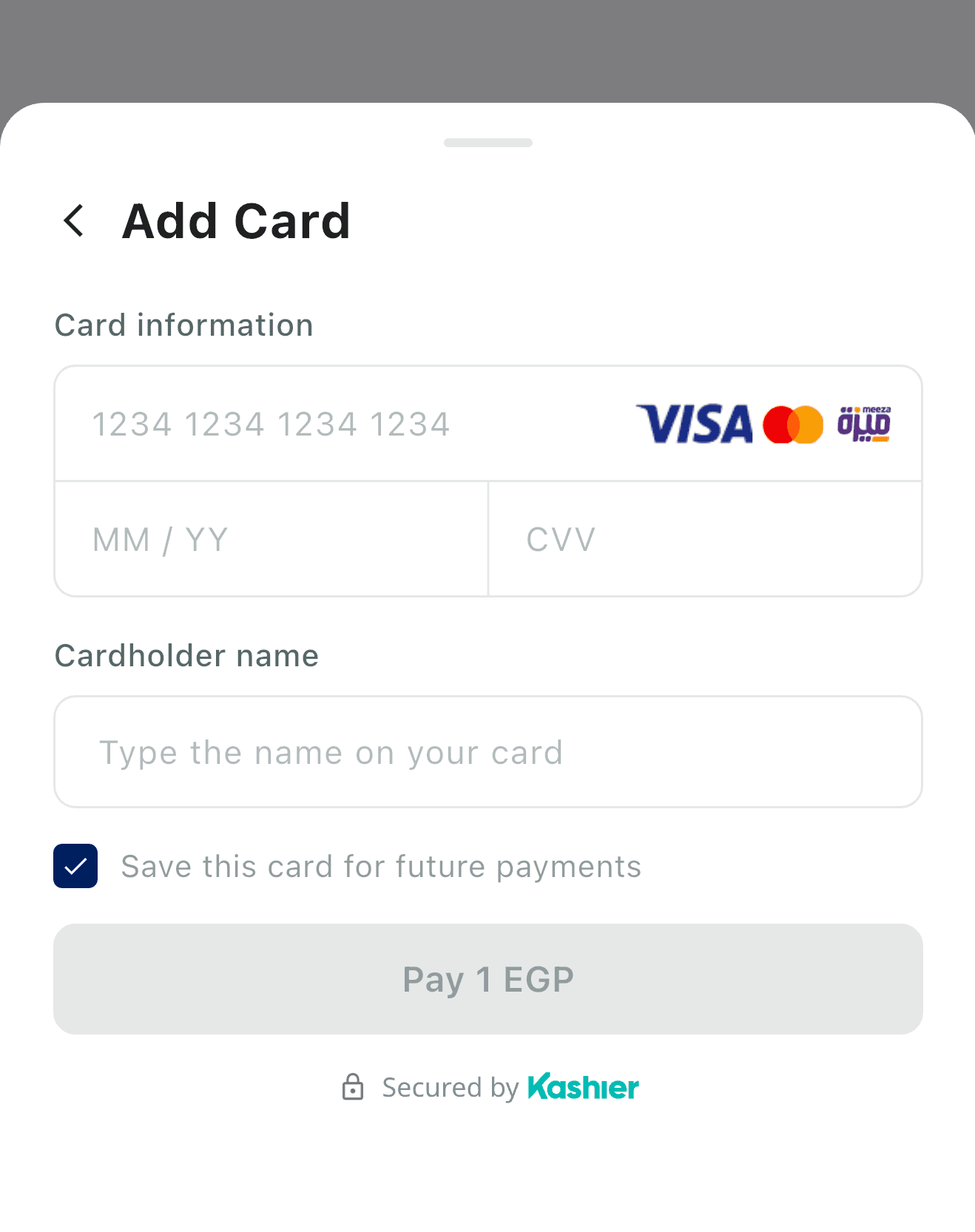
The new-card form as it appears in KashierMode.LIVE for a session that permits card saving. In KashierMode.TEST the save-card checkbox is hidden and a "Use Testing Data" button is added above the form — see Testing and going live.
Invalid input is reported inline inside the SDK sheet and never reaches your callbacks. API errors that are not 3-D Secure handoffs are shown inline on the form so the user can correct and retry without losing the session.
Saving a card after payment
The "save card" checkbox appears only when all of these hold:
- the session does not hide card saving, and
- the session carries customer data, and
- the SDK is not in
TESTmode.
If the session forces card saving, the checkbox is pre-selected.
What your app sees
| Situation | Result |
|---|---|
| Approved | Succeeded — after the user taps Done |
| Declined by the issuer | Failed(paymentDeclined), with error.responseCode when the gateway supplies one |
| Authorization rejected (HTTP 403) | Failed(authorizationFailed) |
| 3-D Secure failed | Failed(authenticationFailed) |
| Still settling after reconciliation | Pending |
| User dismissed the sheet | Cancelled |
Reconciliation safety net
After a 3-D Secure challenge the SDK polls the order until it reaches a terminal state:
- Post-OTP: 8 attempts —
5s, 5s, 5s, 5s, 10s, 10s, 10s, 10s(first at +5 s, ≈60 s total). - After cancel, or a stuck
INITIATEDorder: 5 attempts —0s, 5s, 10s, 15s, 30s.
If polling exhausts while the server still reports a non-terminal state, the SDK reports Pending. If every attempt errored, it reports a failure instead — the SDK never claims "pending" without a real server response.
Only one terminal result can ever be emitted; a late redirect and an in-flight reconcile cannot both fire a callback.
PCI scope
Card data is entered only inside the SDK's own UI, is held in memory for the duration of the request, and is never persisted, logged, or exposed to your app. Your app never sees a PAN, a CVV, or a card token.
Saved cards
Saved cards let a returning customer pay without re-entering their card number.
When saved cards are fetched
The SDK fetches saved cards only when all of these hold:
cardis an allowed method for the session, and- the session has saved-card retrieval enabled, and
- the session carries a non-empty customer reference.
Otherwise the sheet goes directly to the new-card form. If the fetch fails, the SDK degrades silently to the new-card form — your app sees nothing and no error is surfaced.
Presentation
- With saved cards present, the card section renders as an accordion listing each card with its brand icon, masked number, and expiry.
- Selecting a card reveals an inline CVV field on that row.
- An "Add card" entry opens the standard new-card form.
- While the fetch is in flight the section shows a loading state; if the customer has no saved cards, the section renders empty and the user proceeds with a new card.
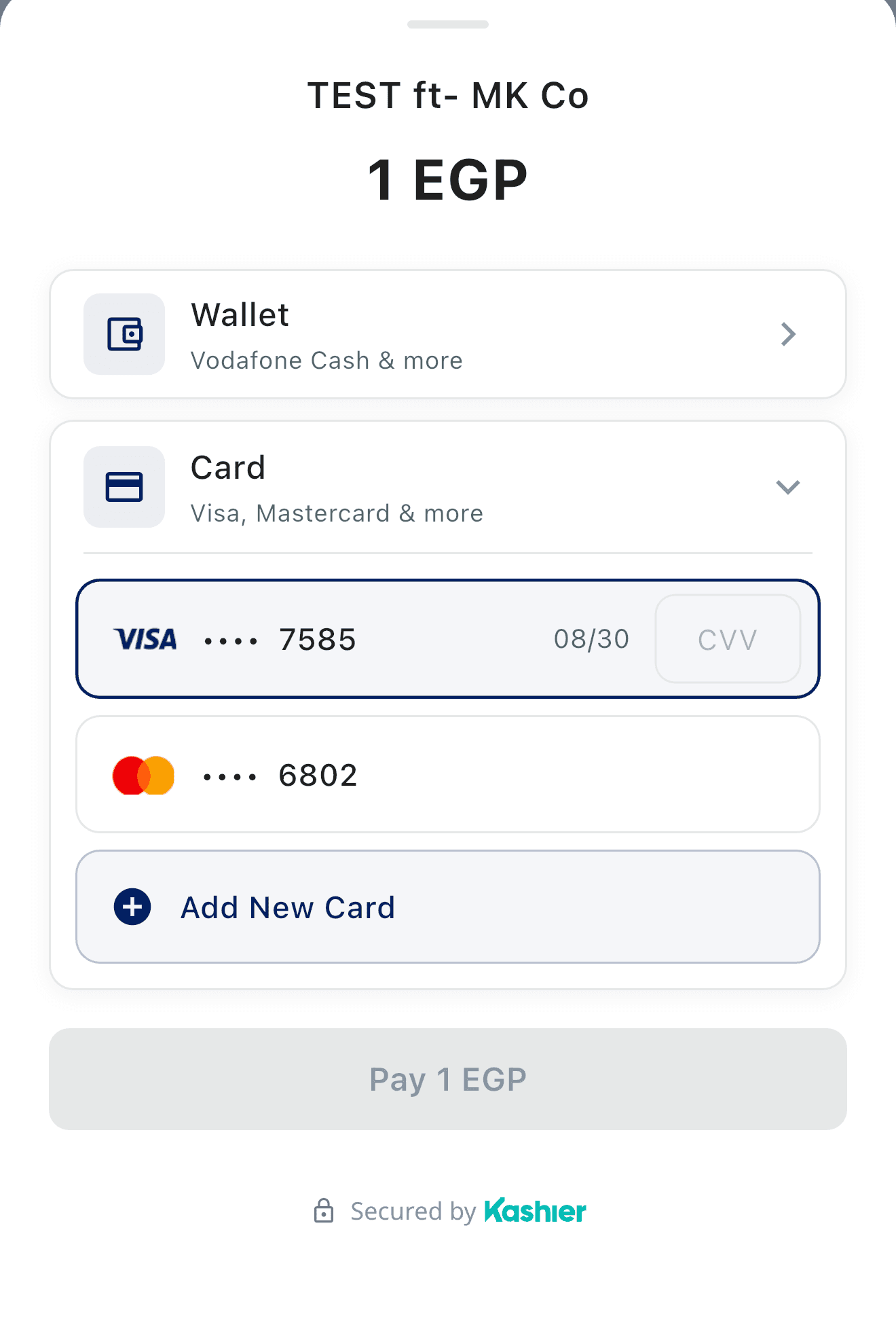
The saved-card accordion. Selecting a card reveals its inline CVV field; the card numbers are masked by the gateway and no card token is ever exposed.
Paying with a saved card
Paying with a saved card requires the CVV to be re-entered. It must be exactly 3 digits; otherwise the SDK reports invalidCardDetails ("Invalid CVV.") inline and no network call is made. From there the flow is identical to a new card, including 3-D Secure.
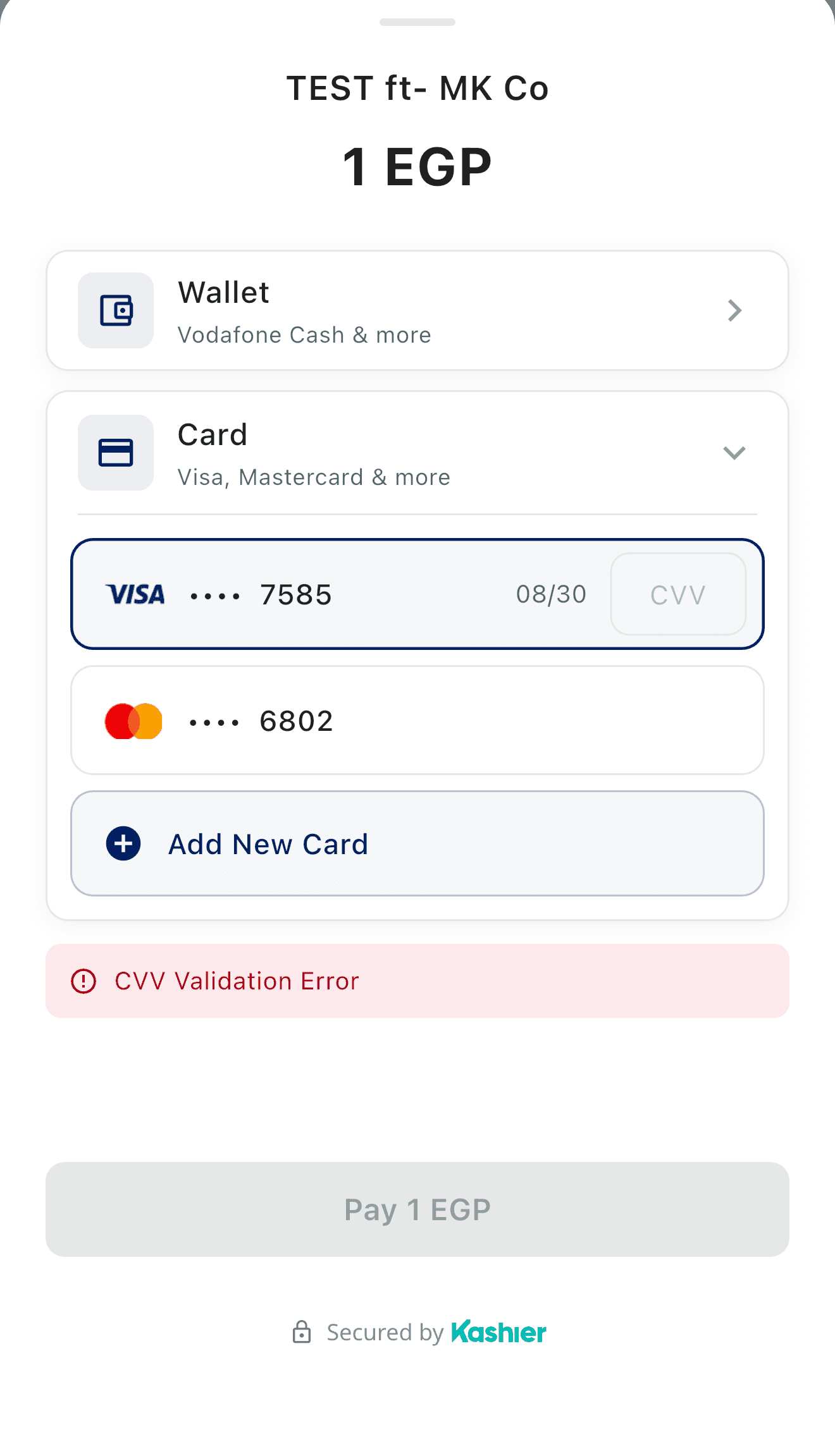
A CVV that is not exactly 3 digits is rejected inside the sheet. No network call is made and your app receives no callback — the user simply corrects the field.
Deleting a saved card
- Swipe a saved-card row to reveal the delete action.
- A confirmation dialog appears before anything is deleted.
- A failed deletion shows a snackbar inside the SDK sheet and surfaces as
cardDeletionFailedinternally. Your app is not notified — the flow continues normally.
Security
Card tokens are never logged, never persisted by the SDK, and never appear in the SDK's accessibility semantics. Your app never receives a card token; the only card data it can see is the display-safe KashierCardInfo on a successful result.
Wallet payments
Shown when the session allows wallet.
Flow
- The user picks the wallet method and enters an Egyptian mobile number. The SDK validates the format
01[0125]followed by 8 digits (11 digits total) and keeps the Pay button disabled until it matches.
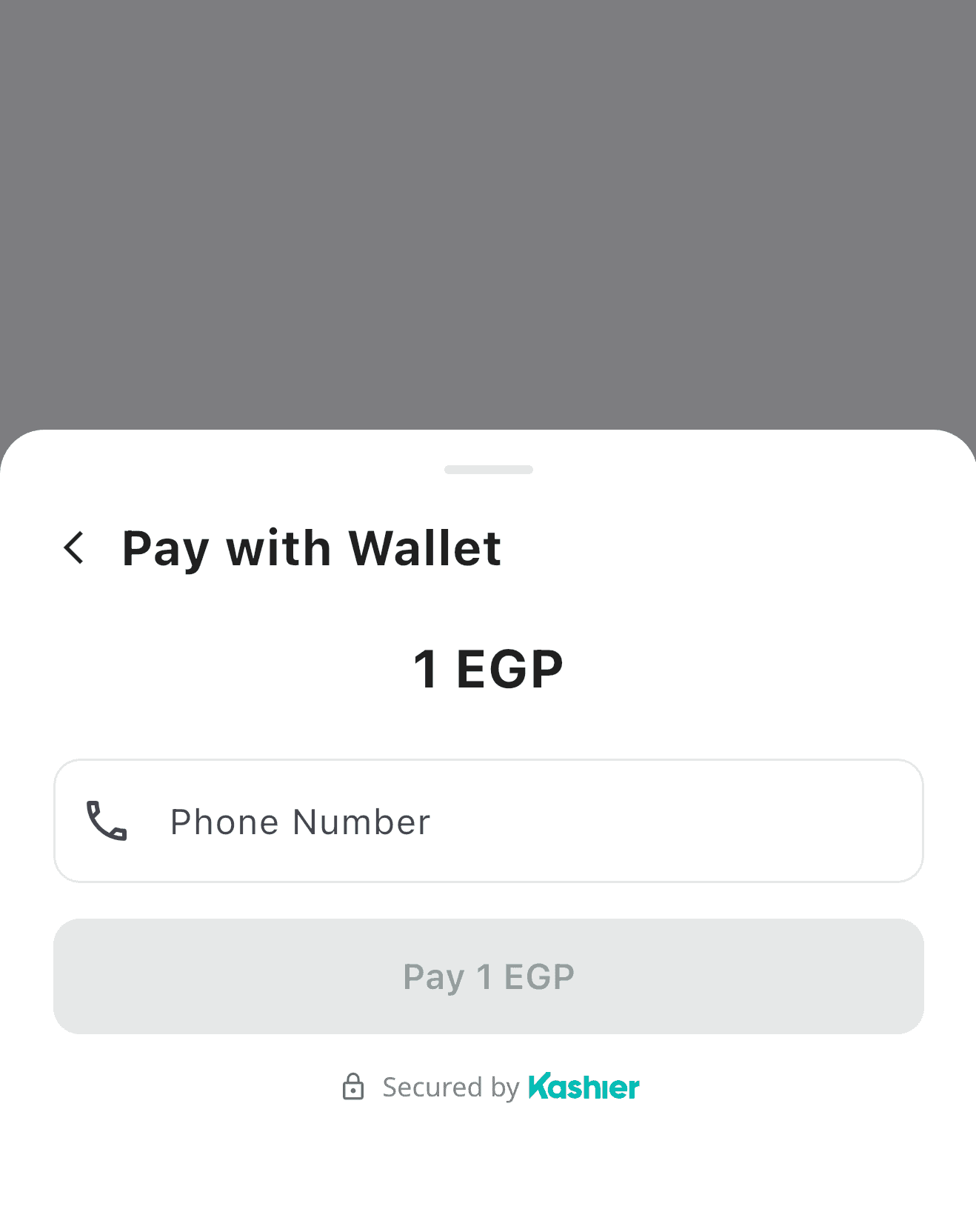
- The SDK sends one request-to-pay. This request is never retried automatically.
- The user approves the payment in their wallet app.
- The SDK shows a 3-step progress sheet and polls for the outcome on a fixed schedule.
Polling schedule
| Phase | Intervals | Fires at |
|---|---|---|
| Phase 1 | 12 × 10 s | 10 s → 120 s |
| Phase 2 | 30 s, 45 s, 60 s | 150 s, 195 s, 255 s |
| Hard cap | 5 minutes (300 s) from poll start | — |
No request is ever armed past the cap. Longer phase-2 intervals are defined in the schedule but are unreachable under the 5-minute cap.
Controls on the waiting sheet
| Control | When it appears | What it does |
|---|---|---|
| Reload | While polling | Immediately re-checks the payment status. Errors are shown inline on the sheet; polling continues either way |
| I have paid | Only after the 5-minute cap is reached with the payment still pending | Emits the terminal Pending result |
| Cancel | Throughout | While polling, returns to the phone-input step and aborts the attempt. At exhaustion, ends the flow as userCancelled |
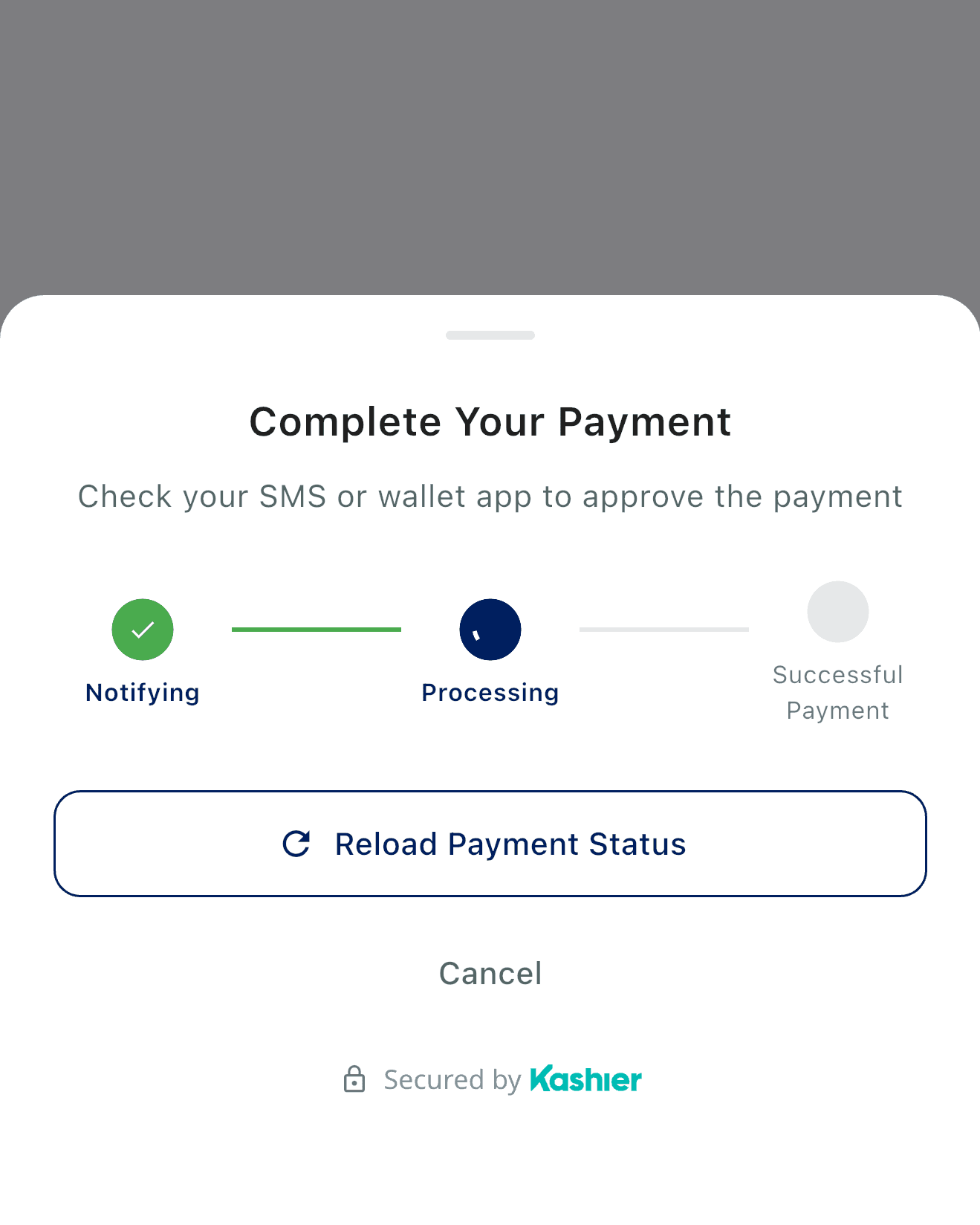
The waiting sheet while polling. Note Reload Payment Status — there is no resend control.
There is no "resend" button. If the request-to-pay needs to be re-sent, the user cancels back to the phone-input step and starts again — which creates a new order.
No duplicate-charge prevention
The SDK makes no duplicate-charge prevention claim for repeated wallet attempts. Duplicate protection is a backend concern.
Exhaustion and reconciliation
When the 5-minute cap is reached with the payment still pending, the SDK stops polling and shows the "I have paid" button. Tapping it emits a terminal Pending result. Your app should then wait for the Kashier webhook or query your backend — pending.orderId is the authoritative reference.
What your app sees
| Situation | Result |
|---|---|
| Wallet approved and reconciled | Succeeded |
| Wallet declined / reconcile failure | Failed |
| Request-to-pay could not be initiated | Failed(walletInitFailed) |
| 5-minute cap reached, user tapped "I have paid" | Pending |
| User cancelled | Cancelled |
3-D Secure
3-D Secure is handled entirely inside the SDK — your app has nothing to implement.
What the user sees
- A full-screen in-SDK WebView loads the issuer's authentication page.
- If the issuer requires a challenge, the OTP screen renders inside that WebView.
- On completion the SDK shows a verifying state while it confirms the outcome, then the result sheet.
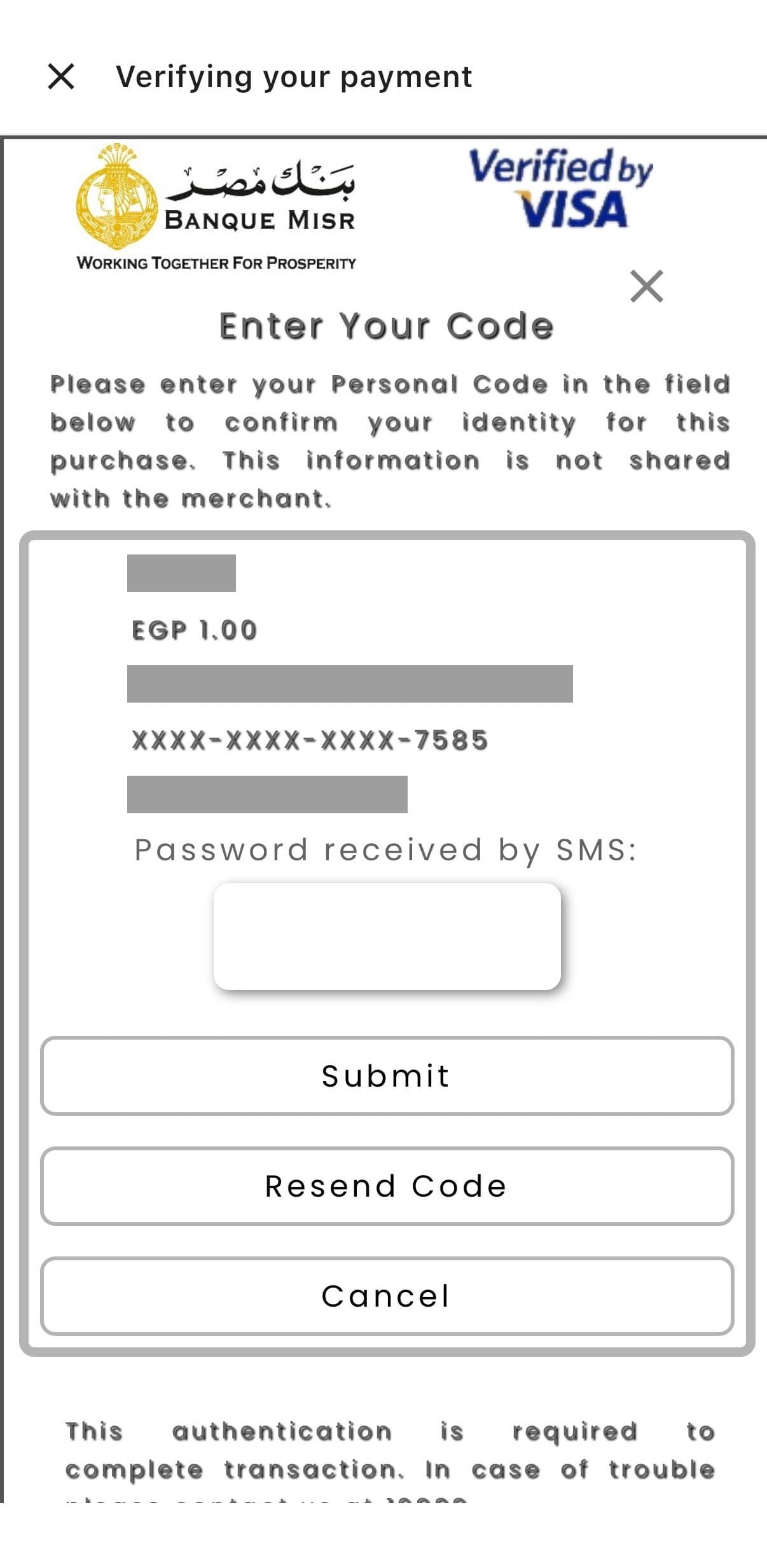
A 3-D Secure OTP challenge inside the SDK's WebView. The page content is served by the cardholder's bank — its layout and wording vary by issuer. Transaction identifiers are masked in this screenshot.
How completion is detected
The SDK recognises the end of the challenge from the merchant redirect, from terminal query parameters on the redirect URL, from gateway redirect URLs that require a reconcile, and from issuer page markers. Timers keep the experience responsive: an OTP loader after 10 s, a reconcile handoff after 20 s, a frictionless-verify fallback after 15 s, plus short DOM probes.
Cancel, timeout, retry
| Action | Behavior |
|---|---|
| Cancel the challenge | userCancelled immediately, with no reconciliation |
| Timeout | Full-screen timeout sheet; paymentTimeout is reported only after the user taps Done |
| Try Again | Restarts the challenge and emits no callback to your app |
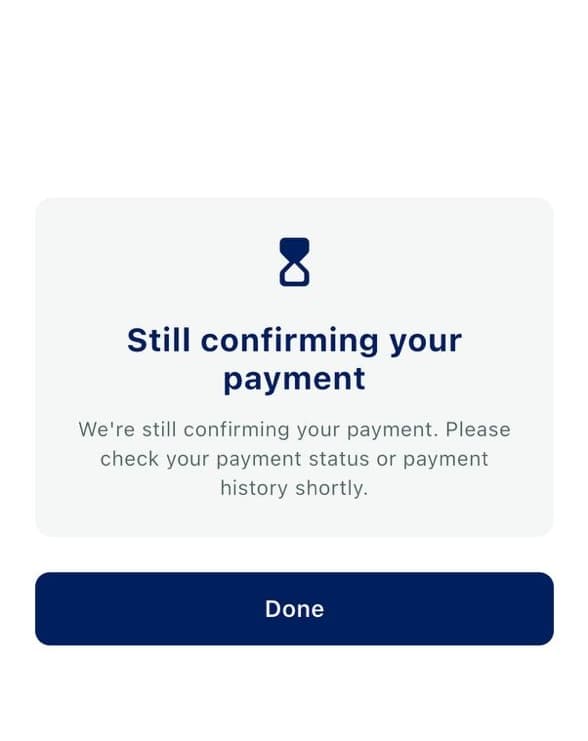
The timeout sheet. paymentTimeout reaches your app only after the user taps Done.
Security
HTTP redirects are disabled at the network layer — any 3xx on an API call is treated as an error, not followed. Issuer-controlled content (URLs, console output, page text) is never logged.
Lifecycle and process death
Registration
Register in onCreate, before the Activity reaches STARTED. This applies to both launch surfaces. Late registration is rejected by AndroidX with IllegalStateException.
Activity vs Fragment
KashierSDK.register(...) requires a ComponentActivity. From a Fragment, either:
- use the canonical contract —
Fragment.registerForActivityResult(KashierPaymentContract())works normally; or - call
KashierSDK.register(requireActivity(), …)and keep the launcher's lifetime tied to that Activity.
Threading
Register and launch from the main thread. Result callbacks are delivered on the main thread by the Activity Result API. The onPending wrapper callback may arrive while your Activity is STOPPED — guard UI work accordingly.
Configuration changes and rotation
Rotation of the SDK's payment Activity is handled internally: the in-flight session and flow state are retained across recreation. Card-entry fields are intentionally not retained.
Your own Activity is recreated normally; because you register in onCreate, the launcher is re-established and the pending result is delivered to the new instance.
Process death
If Android kills your process mid-payment:
- No automatic replay. The SDK never re-submits a payment.
- No crash. Teardown is safe.
- If AndroidX restored a pending result, it is delivered typed-only — raw maps are
null. - If only the launch identity survived, you receive
Unavailable(KashierUnavailableReason.processDeath). On the compatibility wrapper this surfaces asonFailure(unknownError); a not-yet-firedonPendingmay be lost entirely. - Otherwise nothing is delivered.
Reconcile after process death
In every process-death case, reconcile through your backend or Kashier webhooks. A payment may well have succeeded.
Multiple concurrent payments
Not supported by design. A second launch while one is active is rejected with validationFailed and the message "payment already in progress".
Malformed results
If the returned payload is present but corrupt or of an unknown version, you receive Unavailable(malformedResult). parseResult never throws.
Kotlin and Java integration
Kotlin
Use an exhaustive when so new result variants become compile errors rather than silent bugs:
private fun handle(result: KashierResult) = when (result) {
    is KashierResult.Succeeded   -> onPaid(result.result)
    is KashierResult.Failed      -> onFailed(result.error)
    is KashierResult.Pending     -> onPending(result.pending)
    is KashierResult.Cancelled   -> onCancelled()
    is KashierResult.Unavailable -> onUnavailable(result.reason, result.requestId)
}
Building an error with the SDK's built-in English/Arabic default messages:
val error = KashierPaymentError.fromCode(KashierErrorCode.networkError)
println(error.message)    // "A network error occurred. Please check your connection."
println(error.messageAr)  // "حدث خطأ في الشبكة. يرجى التحقق من اتصالك."
Reading the environment URLs, if you need them for diagnostics:
val api = KashierMode.LIVE.baseUrl      // https://api.kashier.io
val fep = KashierMode.LIVE.fepBaseUrl   // https://fep.kashier.io
Java
The public API is fully usable from Java. Entry points are @JvmStatic, model constructors are @JvmOverloads, and all three listeners are functional interfaces, so Java lambdas work.
package com.example.checkout;

import android.os.Bundle;

import androidx.activity.ComponentActivity;
import androidx.activity.result.ActivityResultLauncher;
import androidx.annotation.Nullable;

import io.kashier.sdk.KashierConfig;
import io.kashier.sdk.KashierLanguage;
import io.kashier.sdk.KashierLauncher;
import io.kashier.sdk.KashierMode;
import io.kashier.sdk.KashierPaymentContract;
import io.kashier.sdk.KashierPaymentRequest;
import io.kashier.sdk.KashierResult;
import io.kashier.sdk.KashierSDK;

public final class CheckoutActivity extends ComponentActivity {

    private ActivityResultLauncher<KashierPaymentRequest> launcher;
    private KashierLauncher wrapperLauncher;

    @Override
    protected void onCreate(@Nullable Bundle savedInstanceState) {
        super.onCreate(savedInstanceState);

        if (!KashierSDK.isInitialized()) {
            KashierSDK.initialize(new KashierConfig(KashierMode.TEST, KashierLanguage.EN));
        }

        // 1) Canonical Activity Result API.
        launcher = registerForActivityResult(new KashierPaymentContract(), (KashierResult result) -> {
            if (result instanceof KashierResult.Succeeded) {
                String txId = ((KashierResult.Succeeded) result).getResult().getTransactionId();
                showReceipt(txId);
            } else if (result instanceof KashierResult.Failed) {
                showError(((KashierResult.Failed) result).getError().getMessage());
            } else if (result instanceof KashierResult.Pending) {
                showPending(((KashierResult.Pending) result).getPending().getOrderId());
            } else if (result instanceof KashierResult.Cancelled) {
                returnToCheckout();
            } else if (result instanceof KashierResult.Unavailable) {
                reconcileWithBackend(((KashierResult.Unavailable) result).getReason().name());
            }
        });

        // 2) Compatibility wrapper — onPending may be null, in which case a pending
        //    payment produces no callback at all.
        wrapperLauncher = KashierSDK.register(
                this,
                result -> showReceipt(result.getTransactionId()),
                error -> showError(error.getMessage()),
                pending -> showPending(pending.getOrderId()));
    }

    private void pay(String sessionId) {
        launcher.launch(new KashierPaymentRequest(sessionId));
        // or: wrapperLauncher.start(sessionId);
    }
}
Java notes:
KashierResultis a Kotlin sealed interface — useinstanceofand cast; there is no exhaustiveness check.KashierSDK.registertakes all four parameters in Java; passnullforonPendingif you do not need it.KashierPaymentError.fromCode(...)is available as a static method, with overloads for the optional arguments.new KashierPaymentRequest(sessionId)throwsIllegalArgumentExceptionon a blank session ID.
API reference
Everything below is the entire supported surface. Anything in io.kashier.sdk.internal is not API: it carries no compatibility guarantee and is renamed or removed by R8 in your app.
KashierSDK
| Member | Signature | Notes |
|---|---|---|
initialize | fun initialize(config: KashierConfig) | Throws IllegalStateException if already initialized with a different config |
isInitialized | fun isInitialized(): Boolean | — |
register | fun register(activity: ComponentActivity, onSuccess: KashierSuccessListener, onFailure: KashierFailureListener, onPending: KashierPendingListener?): KashierLauncher | Call in onCreate |
KashierConfig
data class KashierConfig(val mode: KashierMode, val language: KashierLanguage)KashierMode
enum class KashierMode(val baseUrl: String, val fepBaseUrl: String) // TEST, LIVEKashierLanguage
enum class KashierLanguage // EN, ARKashierPaymentContract
class KashierPaymentContract : ActivityResultContract<KashierPaymentRequest, KashierResult>parseResult never throws. Precedence:
RESULT_CANCELED, null intent, or an absent result payload →Cancelled- payload present but corrupt, of an unknown version, or missing
requestId→Unavailable(malformedResult) - well-formed payload → the typed outcome
KashierPaymentRequest
data class KashierPaymentRequest(val sessionId: String) : ParcelableThrows IllegalArgumentException when sessionId is blank. toString() is redacted.
KashierResult
sealed interface KashierResult { val requestId: String }| Variant | Signature |
|---|---|
Succeeded | data class Succeeded(requestId: String, result: KashierPaymentResult) |
Failed | data class Failed(requestId: String, error: KashierPaymentError) |
Pending | data class Pending(requestId: String, pending: KashierPaymentPending) |
Cancelled | data class Cancelled(requestId: String) |
Unavailable | data class Unavailable(requestId: String, reason: KashierUnavailableReason) |
KashierResult is intentionally not Parcelable.
KashierUnavailableReason
| Value | Meaning |
|---|---|
processDeath | The OS killed the process mid-flow; only the launch identity survived |
malformedResult | The delivered payload was corrupt, of an unknown version, or missing its request ID |
configMissing | Reserved. The current SDK never emits it — a missing-config relaunch is reported as processDeath |
KashierRequestId
object KashierRequestId { const val UNKNOWN: String = "" }KashierPaymentResult
data class KashierPaymentResult @JvmOverloads constructor(
    val sessionId: String,
    val status: String,
    val orderId: String? = null,
    val orderReference: String? = null,
    val transactionId: String? = null,
    val authorizationNumber: String? = null,
    val amount: Double? = null,
    val currency: String? = null,
    val card: KashierCardInfo? = null,
    val message: String? = null,
    val messageAr: String? = null,
    val transactionData: Map<String, Any?>? = null,
)
See Handling payment results for field semantics. toString() deliberately excludes transactionData.
KashierPaymentError
data class KashierPaymentError @JvmOverloads constructor(
    val code: KashierErrorCode,
    val message: String,
    val messageAr: String? = null,
    val responseCode: String? = null,
    val details: Any? = null,
) {
    companion object {
        @JvmStatic @JvmOverloads
        fun fromCode(
            code: KashierErrorCode,
            message: String? = null,
            messageAr: String? = null,
            responseCode: String? = null,
            details: Any? = null,
        ): KashierPaymentError
    }
}
fromCode fills in the SDK's built-in English/Arabic default message for the code. message is always non-null and English. toString() deliberately excludes details.
KashierPaymentPending
data class KashierPaymentPending @JvmOverloads constructor(
    val orderId: String,
    val transactionId: String,
    val message: String,
    val messageEn: String? = null,
    val messageAr: String? = null,
)
KashierCardInfo
data class KashierCardInfo @JvmOverloads constructor(
    val brand: String? = null,
    val maskedNumber: String? = null,
    val wallet: String? = null,
) : Parcelable
Display-safe: never carries a full PAN, CVV, or card token.
KashierErrorCode
See Error handling for all 18 values.
KashierLauncher
interface KashierLauncher { fun start(sessionId: String) }Never throws; failures reach the registered failure listener.
Listeners
fun interface KashierSuccessListener { fun onSuccess(result: KashierPaymentResult) }
fun interface KashierFailureListener { fun onFailure(error: KashierPaymentError) }
fun interface KashierPendingListener { fun onPending(pending: KashierPaymentPending) }
Error handling
KashierPaymentError carries:
| Field | Meaning |
|---|---|
code | KashierErrorCode — machine-readable classification |
message | Human-readable English message (never null) |
messageAr | Arabic message, when available |
responseCode | Issuer/processor response code (e.g. "57"), when available |
details | Raw error details. Always null on the Activity Result API. Sensitive |
Error codes
| Code | Trigger | Retryable | Recommended handling |
|---|---|---|---|
sessionExpired | Session fetch returned HTTP 410 | New session required | Ask your backend for a fresh session |
sessionNotFound | Session fetch returned HTTP 404 | New session required | Verify the session ID; create a fresh one |
userCancelled | User dismissed the sheet, pressed back, or cancelled 3-D Secure | Yes | Return to checkout silently |
validationFailed | Blank session ID, or a launch while another payment is active | Yes, once the active payment ends | Guard your launch entry point |
paymentDeclined | Gateway reported a failed transaction; responseCode is populated when supplied | Yes, with another instrument | Show the issuer message; offer another card |
authorizationFailed | HTTP 403 on an order operation | Usually not from the app | Check merchant/gateway configuration server-side |
networkError | Connectivity preflight failed, or a transport error occurred | Yes | Prompt to check connectivity and retry |
paymentTimeout | 3-D Secure flow timed out; delivered after the timeout sheet's Done | Yes | Reconcile, then allow a fresh attempt |
walletInitFailed | Wallet request-to-pay could not be initiated | Yes, user-driven | Shown inline by the SDK |
cardRetrievalFailed | Saved-card fetch failed | Handled internally | None — the SDK falls back to the new-card form |
cardDeletionFailed | Saved-card deletion failed | Yes | None — the SDK shows a snackbar |
invalidCardDetails | Invalid card number, name, expiry, or CVV | Yes | None — the SDK shows inline validation |
authenticationFailed | 3-D Secure authentication failed | Yes | Suggest retrying or another card |
unknownError | Unclassified failure; also "SDK not initialized" and the wrapper's mapping of Unavailable | Depends | Reconcile with your backend before deciding |
applePayNotAvailable | — | — | Never emitted on Android |
applePayConfigError | — | — | Never emitted on Android |
merchantValidationFailed | — | — | Never emitted on Android |
tokenProcessingFailed | — | — | Never emitted on Android |
Apple Pay codes on Android
The last four values exist only so the enum matches Kashier's other SDKs. No Android code path produces them. Handle them in an else branch; do not build UX around them.
Localized error copy
The SDK's own sheets are already localized by KashierConfig.language. For errors you surface yourself, use message (English) and messageAr (Arabic), or map code to your own strings — recommended if your app supports languages beyond English and Arabic.
Diagnostics
The SDK writes nothing to logcat, by design. To diagnose a payment, correlate on the server side using orderId / orderReference / transactionId from the result, and use responseCode for issuer declines.
R8, ProGuard and security
R8 / ProGuard
You do not need to add any rules.
The SDK ships its consumer rules inside the AAR. They keep exactly the public API — every class listed in API reference, plus the attributes consumers need (Signature, InnerClasses, EnclosingMethod, annotations) — and deliberately do not keep io.kashier.sdk.internal.*, so internal classes stay eligible for renaming and removal in your minified build.
Do not add rules such as -keep class io.kashier.sdk.** { *; }. Broad wildcards defeat the SDK's encapsulation and keep code that is meant to be stripped.
This is verified by an automated check in the SDK repository, which builds a minified consumer app and asserts that every public class survives under its original name while io.kashier.sdk.internal types do not. The single unavoidable exception is the manifest-declared payment Activity, since Android component names cannot be renamed.
Your responsibilities
- Create sessions on your backend. Never create a payment session from the app.
- Never embed Kashier API credentials or your merchant ID in the app. The SDK does not need them and never asks for them.
- Reconcile server-side before fulfilling. Treat webhooks and your backend as the source of truth — especially for
PendingandUnavailable. - Treat the session ID as a capability. It authorizes a payment. Do not log it, persist it in analytics, or embed it in URLs or crash reports.
- Never log
transactionDataordetails. They may contain the full raw backend response. They are provided in-process only, on the compatibility wrapper path, and are alwaysnullon the Activity Result API. The SDK's owntoString()implementations already exclude them. - Do not collect card data yourself. The SDK's UI is the only place PAN and CVV are entered.
What the SDK guarantees
- Card data is never persisted, never logged, and never stored in SDK fields — it exists only as request arguments in memory.
- No logging interceptor exists in the published AAR; no URLs, headers, bodies, hashes, tokens, or customer data are ever written to logs.
- The payment hash comes from the session, is forwarded verbatim, and is scoped to the specific Kashier host and paths that require it. There is no client-side cryptography.
- HTTP redirects are disabled; any 3xx on an API call is an error.
- The SDK's payment Activity is not exported and has no intent filters.
- Saved state contains only the launch's request identifier — never card data, tokens, customer data, or response payloads.
- Saved-card tokens never appear in the SDK's accessibility semantics.
KashierCardInfois display-safe by construction.
Testing and going live
Test mode
KashierSDK.initialize(KashierConfig(KashierMode.TEST, KashierLanguage.EN))Test mode points the SDK at https://test-api.kashier.io / https://test-fep.kashier.io and changes two UI behaviors on the card form:
- A "Use Testing Data" button appears above the form and prefills it with card number
4508 7500 1574 1019, expiry06/27, CVV100, and nameJohn Doe. - The "save card" checkbox is hidden (it is shown only in
LIVEmode, and only when the session permits card saving and carries customer data).
These two differences are the quickest way to confirm which mode you are in: the card-form screenshot in Card and saved cards shows the LIVE appearance — checkbox present, no testing-data button.
Test sessions come from your Kashier test-mode merchant account. Obtain approving, declining, and 3-D Secure test instruments, and test wallet numbers, from your Kashier integration contact — they vary per merchant configuration.
What to exercise
| Path | How |
|---|---|
| Card success | Session allowing card; approving test card |
| Card decline | Declining test card → Failed(paymentDeclined) |
| Card validation | Submit invalid number / expiry / CVV → inline errors, no callback |
| 3-D Secure success | Session/card that triggers a challenge; enter the correct OTP |
| 3-D Secure failure | Wrong OTP → challenge rejects; no crash |
| 3-D Secure cancel | Cancel the challenge → Cancelled |
| Saved cards | Session with saved-card retrieval enabled and a customer reference |
| Saved-card delete | Swipe a row, confirm |
| Wallet success | Session allowing wallet; approve in the wallet app |
| Wallet pending | Do not approve; wait out the 5-minute cap; tap "I have paid" → Pending |
| Cancellation | Dismiss the sheet / press back → Cancelled |
| Concurrency | Launch twice quickly → second attempt validationFailed |
| Rotation | Rotate mid-payment; the flow survives |
| Process death | Enable "Don't keep activities"; verify Unavailable(processDeath) |
| Localization + RTL | Switch to KashierLanguage.AR; verify Arabic copy and right-to-left layout |
Demo app
Kashier provides a demo Android app that exercises the SDK end to end. It collects a session ID, lets you pick TEST/LIVE and EN/AR, and exposes both launch surfaces side by side so you can compare their result semantics against the same session — useful for seeing the expected behaviour of a path before you implement it, and for checking whether an issue is in the SDK or in your integration.
Request the demo build from your Kashier integration contact.
Going-live checklist
KashierMode.LIVEis used in release builds, andTESTnever ships to production.KashierSDK.initialize(...)is called exactly once, before any launch.- Both launch surfaces are registered in
onCreate. - Every
KashierResultvariant is handled — includingPending,Cancelled, andUnavailable. - Backend/webhook reconciliation is live and is the source of truth for fulfilment.
- No Kashier API credentials or merchant IDs exist anywhere in the app or its resources.
- Session IDs are not logged, persisted, or sent to analytics/crash reporting.
transactionDataanddetailsare never logged or persisted.- No
-keep class io.kashier.sdk.**wildcard was added to your ProGuard configuration. - Release build tested with R8 enabled, end to end.
- Arabic locale and RTL layout verified if you ship
KashierLanguage.AR. - Process-death behavior verified with "Don't keep activities".
- Retry paths create a new session rather than reusing a consumed one.
Frequently asked questions
Can I choose which payment method the sheet shows?
No. Methods come from the session's allowed-methods list, decided by your backend when the session is created. An empty list means all supported methods are shown.
Can I theme the payment sheet from my app?
There is no public theming API. The SDK applies its own design system; a brand color carried by the session recolors the result-sheet action buttons only.
Is Apple Pay supported?
No. Apple Pay is iOS-only. Four Apple-Pay-related values exist in KashierErrorCode purely so the enum matches Kashier's other SDKs; no Android code path emits them.
Can I call initialize again to switch between TEST and LIVE, or change language?
No. Re-initializing with a different config throws IllegalStateException. Decide mode and language at process start.
Why is amount in KashierPaymentResult nullable and only "approximate"?
It is a display convenience. Invalid or missing backend values map to null rather than throwing. Use your backend's amount for anything financial.
Why is transactionData always null?
On the Activity Result API, raw backend maps deliberately never cross the process boundary. They are available best-effort, in-process only, on the compatibility wrapper path — and they are sensitive, so do not log them.
Do I need to handle configMissing?
Handle it for exhaustiveness, but the current SDK never emits it. A relaunch without configuration is by definition process death and is reported as processDeath.
What happens if the user backgrounds the app during a wallet payment?
Polling continues while the SDK Activity lives, up to the 5-minute cap. If the process is killed, reconcile via your backend.
Is there a "resend" button on the wallet waiting screen?
No. The waiting screen offers Reload (re-check status) while polling, and "I have paid" plus Cancel once the 5-minute cap is reached. To send a new request-to-pay, the user cancels back to the phone-input step.
Can I run two payments at once?
No. The second launch is rejected with validationFailed and the message "payment already in progress".
Does the SDK require Jetpack Compose in my app?
No. The SDK uses Compose internally; no Compose type is on its public API. The Kashier demo app uses plain Android views.
Which ProGuard rules do I add?
None. The SDK ships its own consumer rules inside the AAR.
Is Pending really terminal?
Yes. No success or failure follows it for that launch. Reconcile via backend or webhook.
Does the SDK need android:supportsRtl="true"?
Not for the SDK's own sheet — it pins its layout direction internally. Set it only if your own screens need RTL.
UI screens reference
The SDK renders these screens. Your app does not build or control any of them; this reference exists so you know what your users will see and which screen produces which result.
| Screen | When it appears | Exit paths |
|---|---|---|
| Landing sheet | After the session loads | Wallet tile → wallet phone input; card tile / accordion → card form or saved-card pay; dismiss → Cancelled |
| Card form | New-card entry | Pay → 3-D Secure or result; back → landing; dismiss → Cancelled |
| Card form, test mode | Card form while KashierMode.TEST | Adds the "Use Testing Data" button; hides "save card" |
| Card form, validation errors | Invalid field on submit | Inline errors; no network call, no callback |
| Saved-card accordion | Saved cards available for the session | Select a card → inline CVV → Pay; swipe → delete confirmation; "Add card" → card form |
| Saved-card loading / empty | While fetching, or with no saved cards | Falls through to the new-card path |
| Delete confirmation dialog | Swipe on a saved-card row | Confirm → delete (snackbar on failure); cancel → accordion |
| Wallet phone input | Wallet method chosen | Pay → waiting sheet; back → landing |
| Wallet waiting | Request-to-pay sent | Reload; Cancel → phone input; terminal reconcile → result |
| Wallet pending exhausted | 5-minute cap reached, still pending | "I have paid" → Pending; Cancel → Cancelled |
| 3-D Secure WebView | Issuer requires authentication | Completion → verifying; cancel → Cancelled |
| 3-D Secure verifying | Challenge finished, outcome confirming | Automatic → result or pending |
| 3-D Secure timeout | Authentication timed out | Done → Failed(paymentTimeout); Try Again → restart, no callback |
| Success sheet | Payment approved | Done → Succeeded |
| Failure sheet | Payment failed | Dismiss → Failed; Try Again → back into the flow, no callback |
| Pending modal | Settlement still running | Done → Pending |
Every screen renders in English (LTR) or Arabic (RTL) according to KashierConfig.language.
Screenshots for the landing sheet, card form, saved-card accordion, CVV validation, wallet phone entry, wallet waiting, 3-D Secure challenge, 3-D Secure timeout, and the success sheet appear in their respective sections above. All were captured against a test merchant account with transaction identifiers masked.
Screens not yet illustrated: the delete-confirmation dialog, the wallet pending-exhausted state, the pending modal, and the failure sheet. Their behaviour is described in the table above.
Support and license
Support
- Developer portal: developers.kashier.io
- For integration issues, include: SDK mode (
TEST/LIVE), Android API level, device model, theKashierErrorCode, theresponseCodeif present, and the order ID or order reference. - Never share session IDs, card data, OTPs, raw
transactionData, or rawdetailsin a support request.
License
The Kashier Native Android SDK is proprietary software owned by Kashier. It is distributed under the Kashier Proprietary SDK License: read the full license.
The same license text ships as the LICENSE file inside the SDK distribution, and the license name and URL above are declared in the published Maven POM.
In summary — the full license text governs, this is not a substitute for it:
- You may download, integrate, and distribute the SDK inside your own application solely to enable Kashier payment services.
- You may not redistribute the SDK as a standalone product, modify it, create derivative works, or reverse engineer, decompile, or disassemble it.
- You may not remove or alter Kashier's proprietary, trademark, or copyright notices, or use the SDK to provide payment services other than through Kashier.
- Third-party components bundled with or required by the SDK remain subject to their own license terms.
- Use of Kashier payment services is additionally governed by your merchant agreement and the applicable Kashier terms of service.